beads.nvim
Neovim UI for beads (bd) — the
dependency-first issue tracker. Browse and filter issues in Telescope, edit
them in a floating detail view, and walk dependency chains without leaving the
editor.
📖 Documentation — https://beads.tomfordweb.com
How it works
beads.nvim is a front end for the bd CLI: bd stays the single source of
truth and the plugin keeps no issue state of its own, so every change you make
in the UI is an ordinary bd mutation. State, history, and sync stay bd's
concern — see bd's
sync model.
Examples
Short clips of the common flows (synthetic demo data — no personal tracking on
screen). Each is rendered headlessly by the recording/ pipeline.
Browse and filter
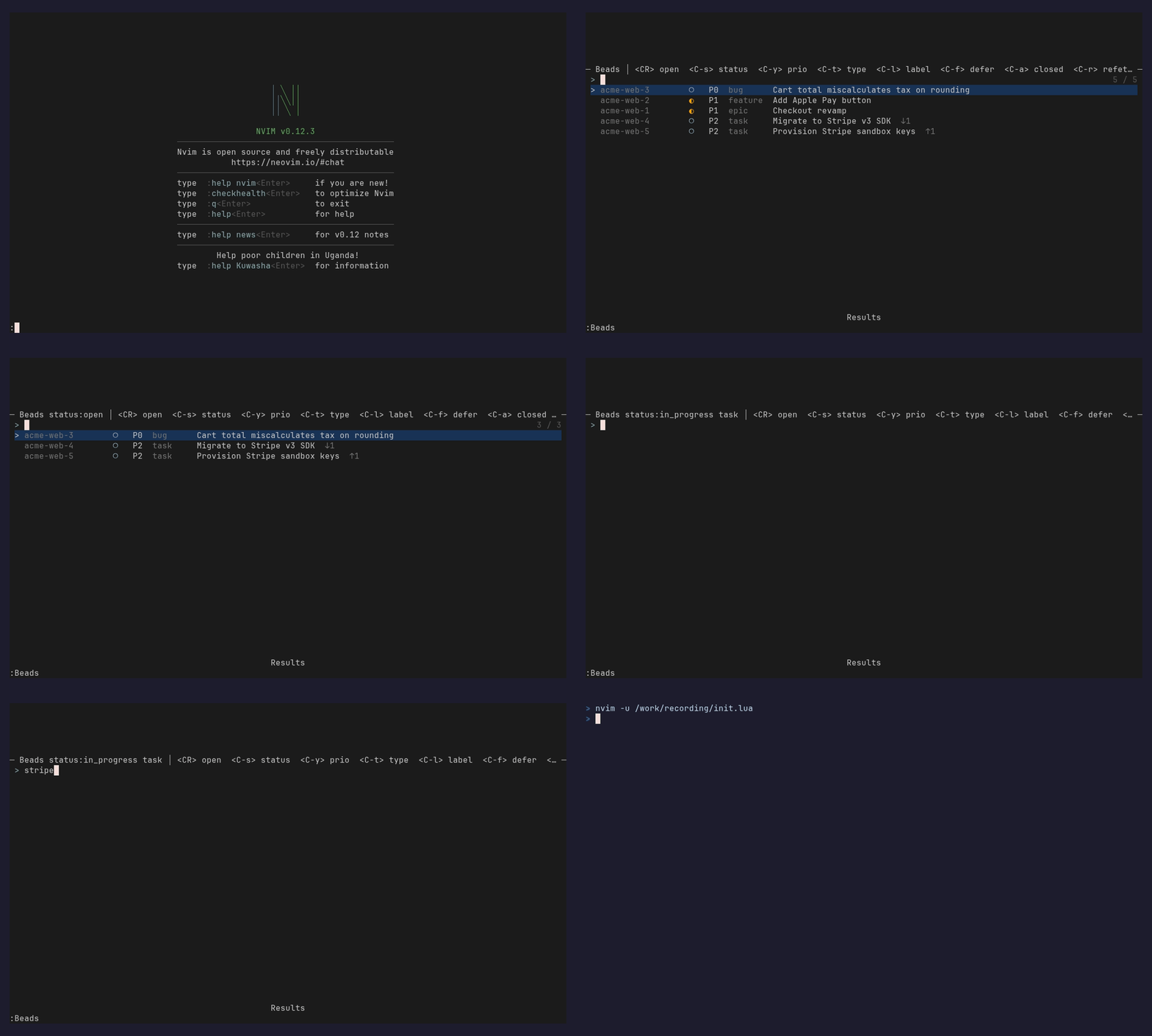
:Beads opens a Telescope picker over bd list. Cycle the status / priority /
type / label filters (<C-s>, <C-y>, <C-t>, <C-l>) or type to filter by
text — one fetch, client-side filtering, no subprocess per keystroke.
Create an issue
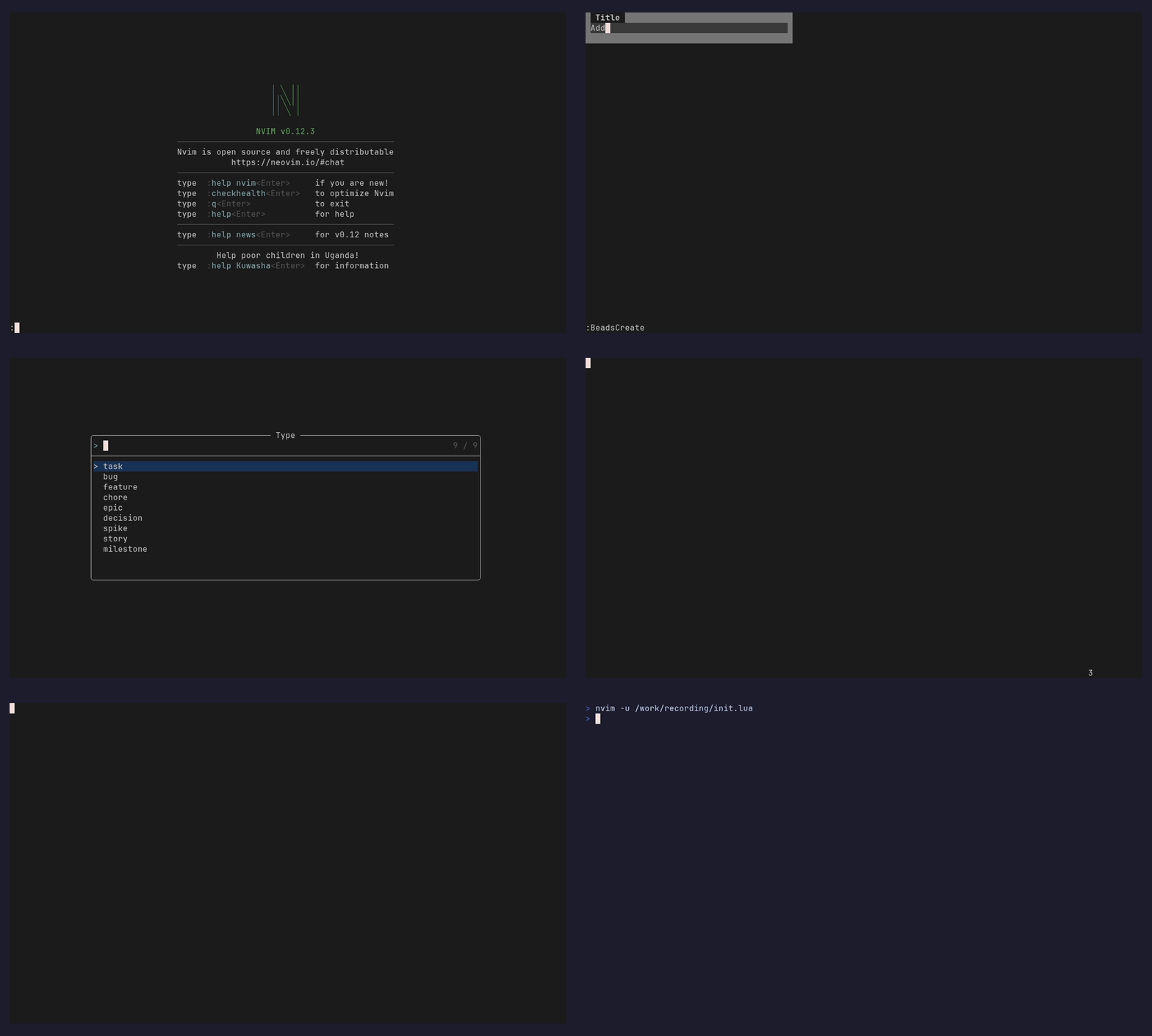
:BeadsCreate walks a quick form — title → type → priority → dependencies —
then drops you into the new issue's detail view. (:BeadsQuick is the one-line
version.)
Open and edit
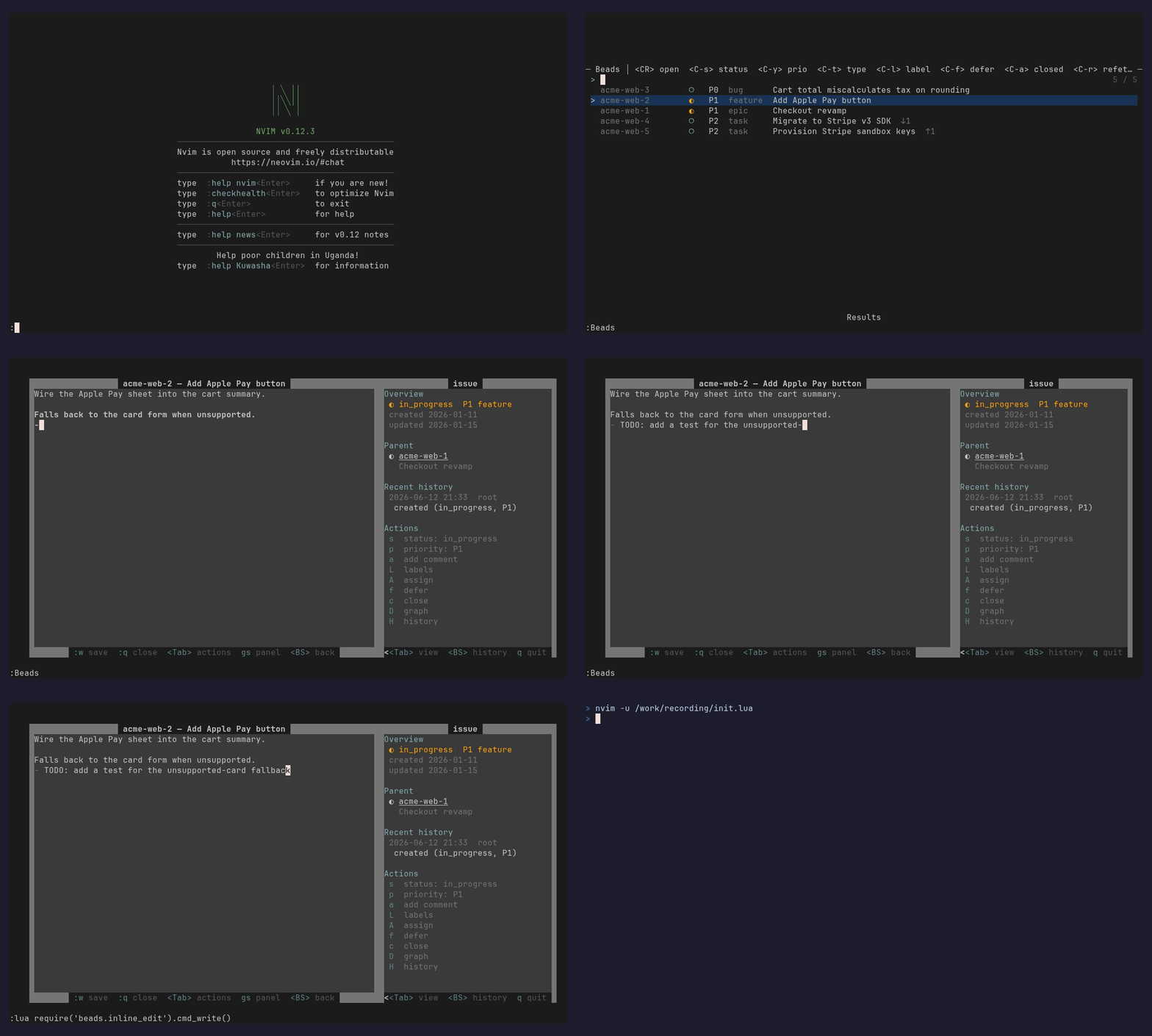
Selecting an issue opens its description as a real, always-editable buffer:
every vim keybind works, and :w persists the change via bd update.
Change status and act on an issue
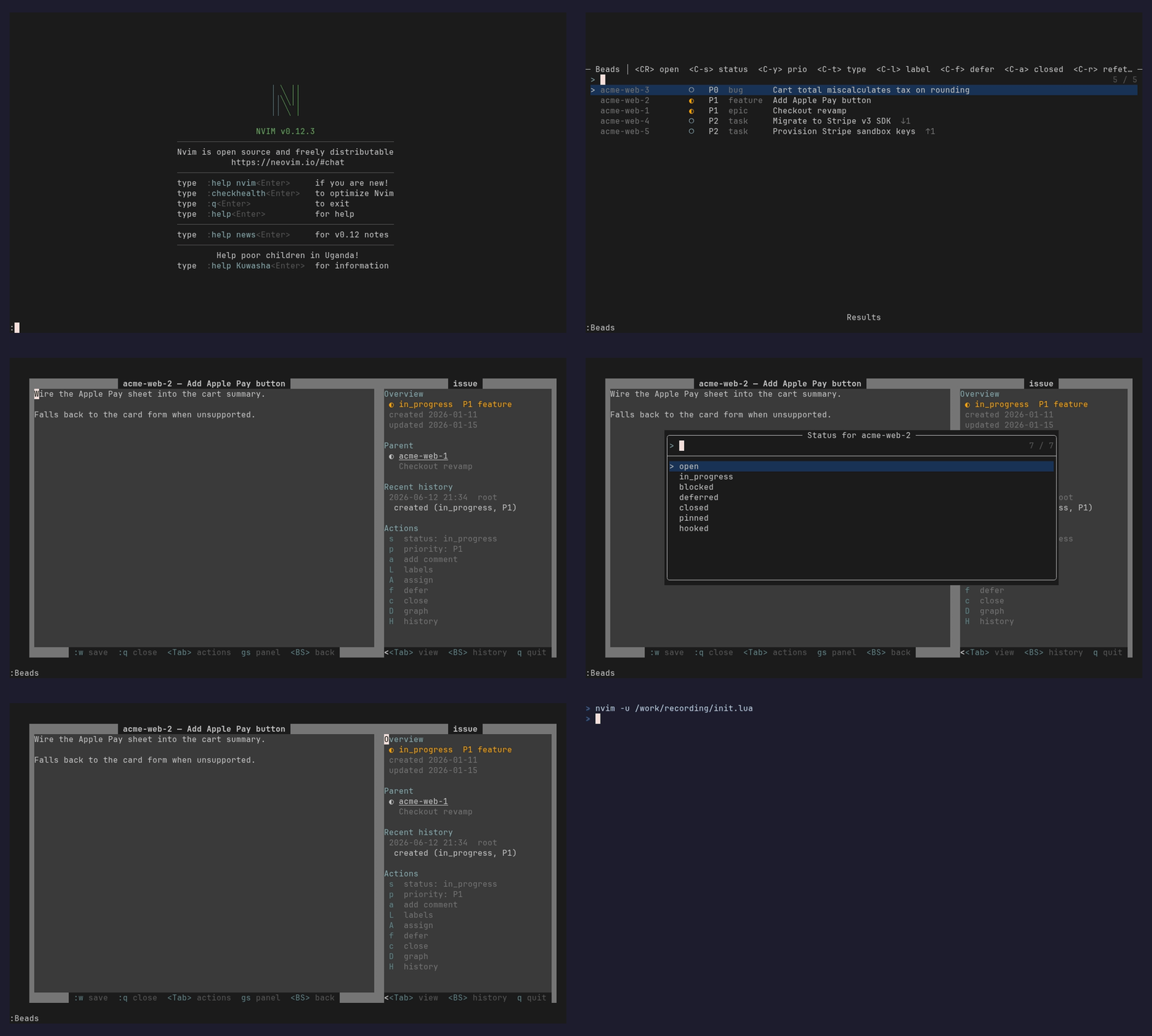
<Tab> jumps to the sidebar, where the Actions rows drive the issue — press
s to change status (and p priority, a comment, c close, …), each a
single keystroke, with the change logged in the issue's history.
Project status at a glance
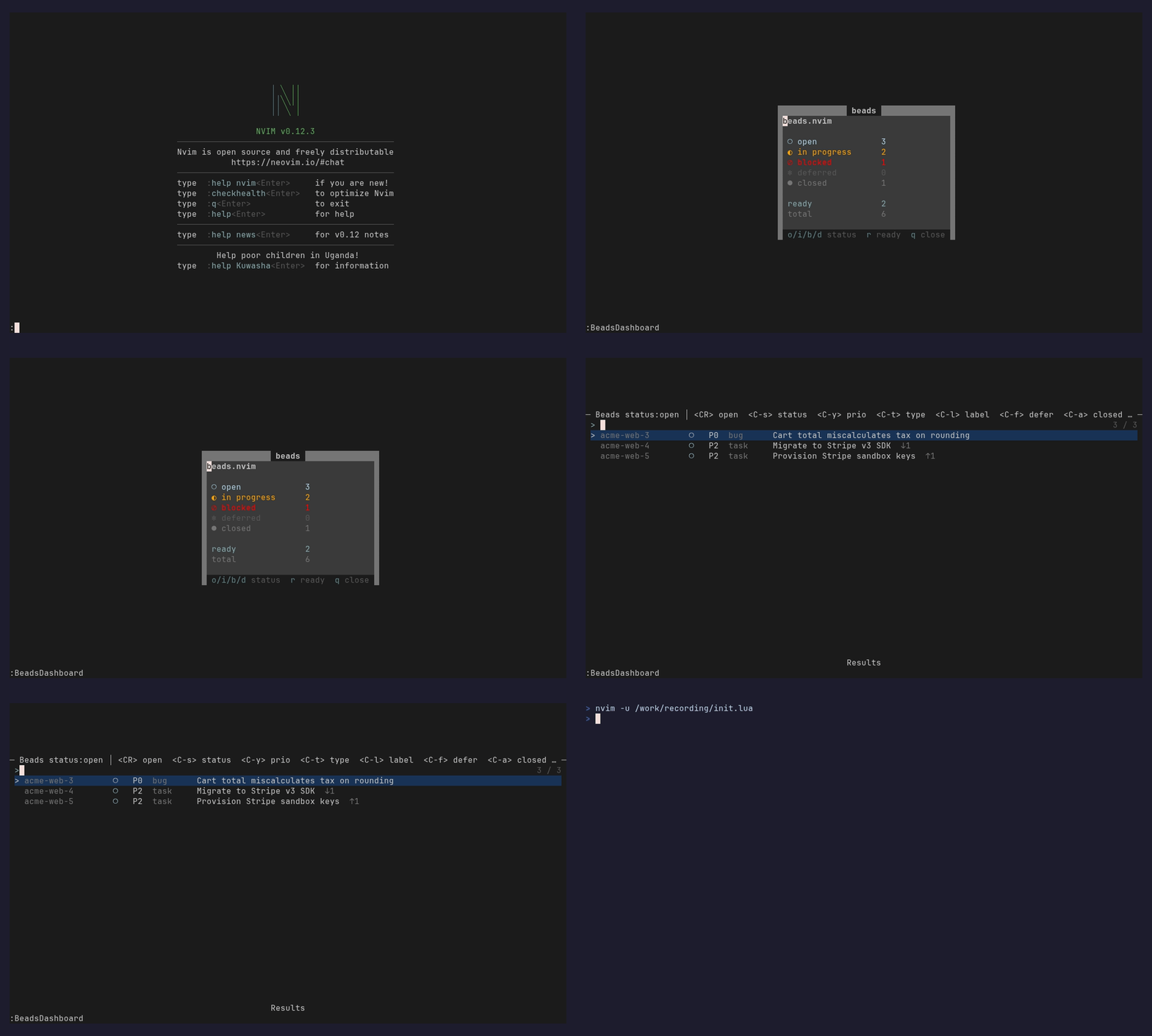
:BeadsDashboard summarises the project from bd stats — open / in progress /
blocked / closed counts, ready work, and total — and each row jumps into that
filter.
Issues as a kanban board
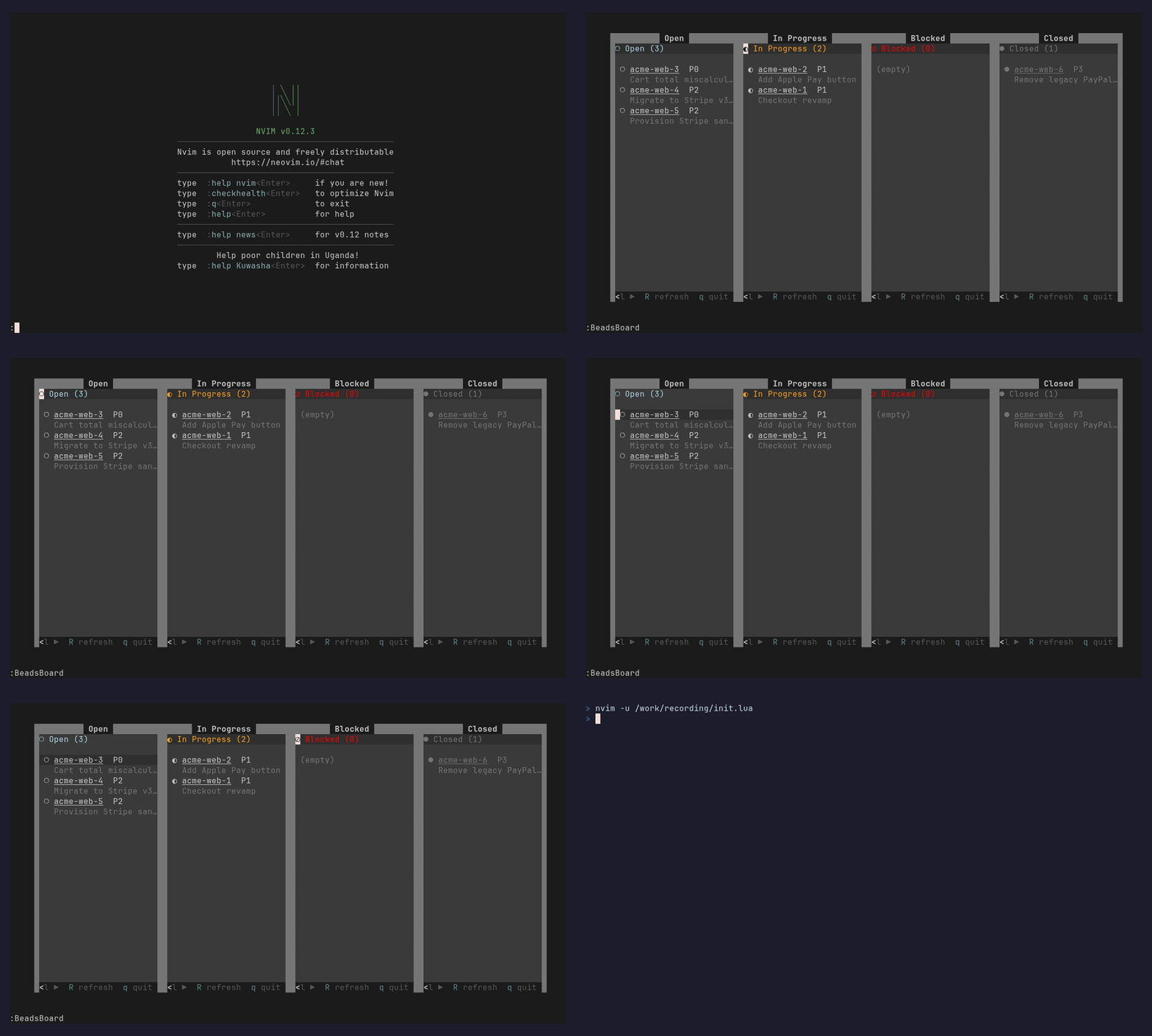
:BeadsBoard lays every issue out as status columns — open, in progress,
blocked, and closed by default (configurable). h/l move between columns,
j/k within one, <CR> opens the detail view, and s moves a card to
another status.
Walk the dependency graph
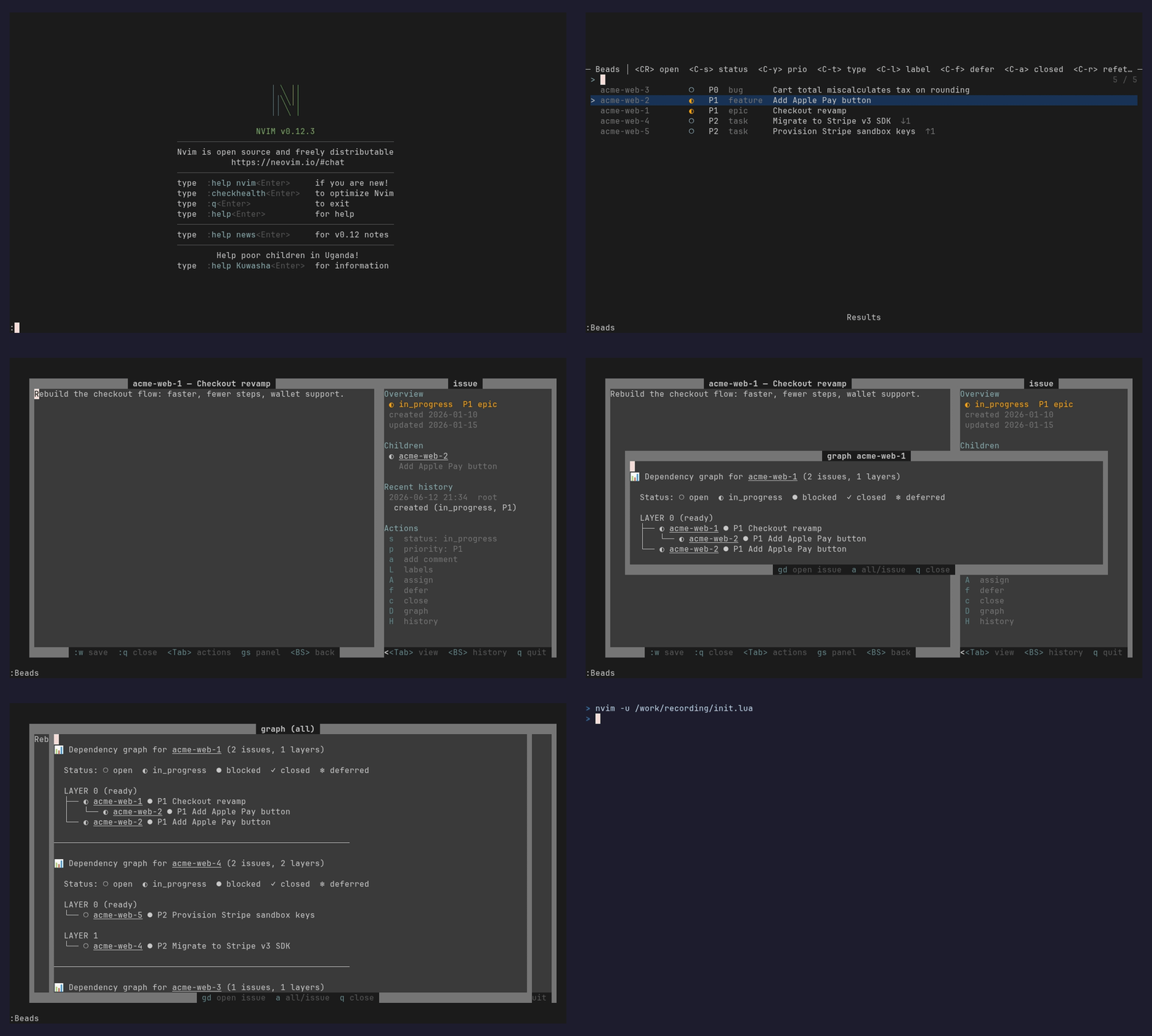
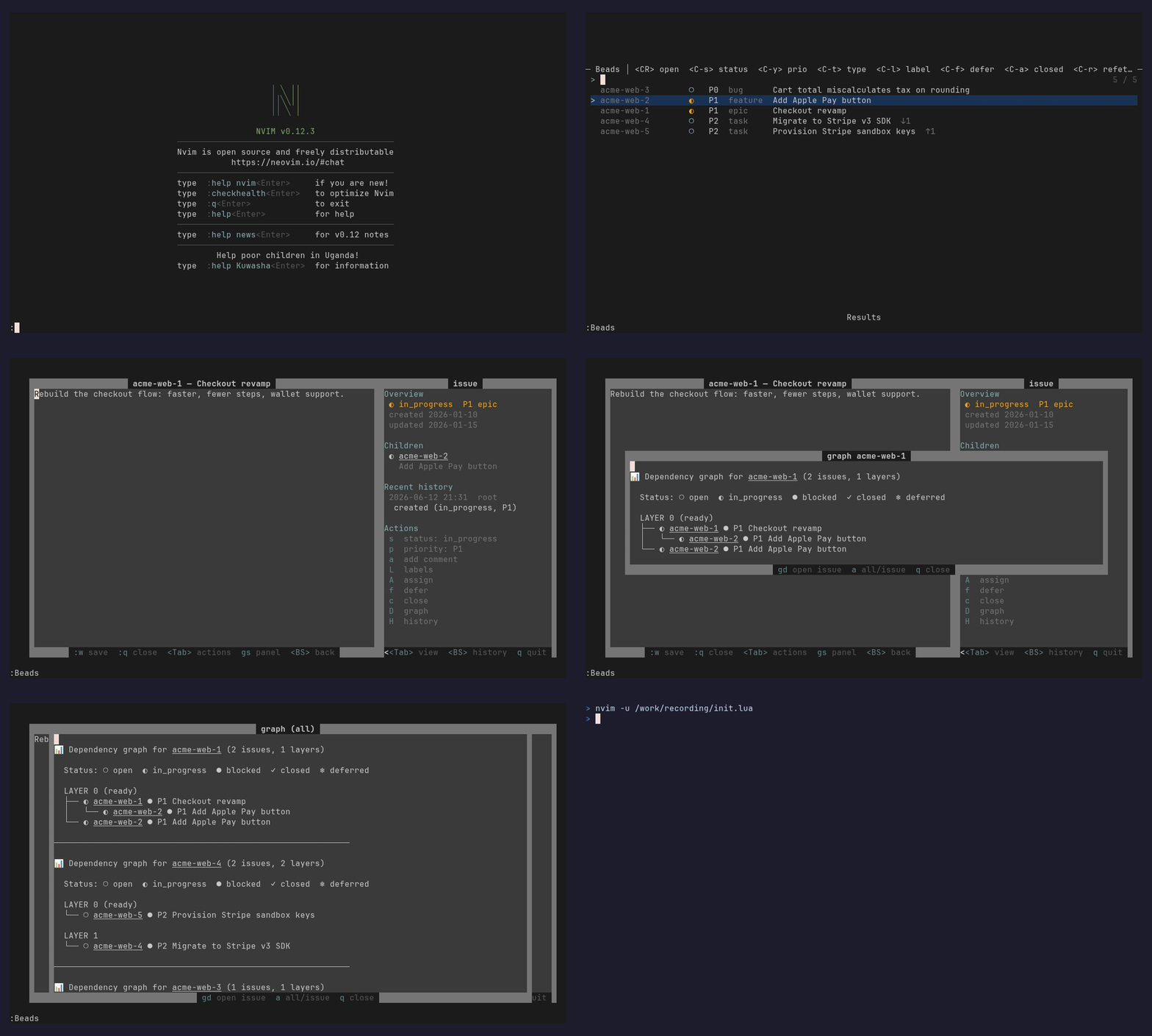
From the sidebar, D opens the dependency graph for the issue; a toggles to
the all-issues view, and gd follows any id straight to its issue.
Features
The headline flows are shown above; here is the full set, top to niche.
- Issue browser (
:Beads) — Telescope picker overbd listwith live filter cycling (status / priority / type / label / closed) and a rendered preview. One fetch, client-side filtering — no subprocess per keystroke. - Editable detail view — the detail float is the issue description as a
real, always-editable buffer;
:wpersists viabd update. Optional autosave and persistent undo. (editable_description = falserestores the legacy read-only view with single-key actions.) - Issue sidebar — companion pane: overview, an Actions section
(status, priority, comment, labels, assign, defer, close/reopen, graph,
history — each a single key), plus parent / children / depends_on / blocks /
comments / history, every id jumpable.
<Tab>switches panes,gstoggles. - Create —
:BeadsCreateinteractive form (title / type / priority / deps) or:BeadsQuickone-line capture. - Dependency graph —
:BeadsGraph [id](orDin the detail view) showsbd graph --compact; ids are links,gdfollows them,atoggles single- issue ↔ all-issues. - Home dashboard —
:BeadsDashboardshows status counts, ready, and total frombd stats; each row jumps into that filter. - Kanban board —
:BeadsBoardgroups every issue into status columns;h/lswitch columns,<CR>opens detail,smoves a card. - Command palette —
:BeadsPaletteruns repo-level commands (status,epic status,ready,blocked,stale,lint,doctor,find-duplicates,orphans,dep cycles, …) with output in a float. - Live search —
:BeadsSearchre-queriesbd searchper keystroke, covering description text the cached picker can't;<C-a>includes closed. - Memories —
:BeadsMemoriesbrowses the bd memory store;<CR>edits (:w→bd remember),<C-n>creates,<C-d>forgets. - Change history — the
historyaction shows an issue's tracked-field transitions; the last few render inline in the sidebar. - Labels — the
labelsaction adds/removes labels;<C-l>filters the browser by label. - Formulas / molecules —
:BeadsFormulaslists bd's workflow formulas; pick one to show its structure or pour it into a molecule (bd mol pour). - Wisps —
:BeadsWispslists bd's ephemeral agent-runtime issues;ppromotes one to a permanent bead. Niche — most users never need it.
Plus: a ready view (:BeadsReady), epic children in the sidebar,
inline comments, per-pane help bars, resize-aware floats (re-center
on tmux resize / zoom), and underlined link styling for jumpable ids.
Requirements
- Neovim ≥ 0.10 (
vim.system) - beads (
bd) on$PATH - telescope.nvim (+ plenary)
- Optional: nvim-treesitter
with the
markdownparser — the detail and description-edit buffers setfiletype=markdown, so installing it gives richer syntax highlighting and lets your markdown autoformatters run on:w. The plugin works fully without it (it ships its ownBeads*highlights).
Optional UI enhancers
beads.nvim drives every prompt and message through the standard vim.ui.select,
vim.ui.input, and vim.notify. It never overrides them itself, so any plugin
that improves those APIs upgrades beads automatically — no configuration on the
beads side. None are required; install them only if you want the nicer look.
- dressing.nvim — turns the create form, priority / type / status pickers, the command palette, and board moves into bordered modal selects and inputs (and can route selects through Telescope):
lua
  {
    "stevearc/dressing.nvim",
    event = "VeryLazy",
    opts = {
      input = { border = "rounded" },
      select = { backend = { "telescope", "builtin" }, builtin = { border = "rounded" } },
    },
  }
- nvim-notify — renders beads' status
and error messages as toast notifications instead of
:messageslines:
lua
  {
    "rcarriga/nvim-notify",
    config = function()
      vim.notify = require("notify")
    end,
  }
These override vim.ui.* / vim.notify for your whole editor, not just
beads — that is why they are recommendations rather than dependencies. If you
already run an equivalent (noice.nvim, snacks.nvim, mini.notify, …), beads picks
it up with nothing extra.
Installation
First install bd and confirm it is on
your $PATH (bd version — tested against 1.0.4). Then add the plugin with your
package manager. Every snippet does the same three things: put the plugin on the
runtimepath with its telescope + plenary dependencies, call
require("beads").setup(), and load the Telescope extension.
lazy.nvim
{
  "tomfordweb/beads.nvim",
  dependencies = {
    "nvim-telescope/telescope.nvim",
    "nvim-lua/plenary.nvim",
  },
  config = function()
    require("beads").setup({ keymaps = true })
    require("telescope").load_extension("beads")
  end,
}
packer.nvim
use({
  "tomfordweb/beads.nvim",
  requires = {
    "nvim-telescope/telescope.nvim",
    "nvim-lua/plenary.nvim",
  },
  config = function()
    require("beads").setup({ keymaps = true })
    require("telescope").load_extension("beads")
  end,
})
vim-plug
Declare the plugins in your init.vim/init.lua:
Plug 'nvim-lua/plenary.nvim'
Plug 'nvim-telescope/telescope.nvim'
Plug 'tomfordweb/beads.nvim'
Then, after plug#end(), run the setup in a lua block:
require("beads").setup({ keymaps = true })
require("telescope").load_extension("beads")
mini.deps
local add = MiniDeps.add
add({
  source = "tomfordweb/beads.nvim",
  depends = {
    "nvim-telescope/telescope.nvim",
    "nvim-lua/plenary.nvim",
  },
})
require("beads").setup({ keymaps = true })
require("telescope").load_extension("beads")
After installing, run :checkhealth beads to verify bd and the dependencies
are wired up. Then open Neovim in a repo with a .beads store (or run
:BeadsPalette → init) and run :Beads to browse — <CR> opens an issue,
<Tab> toggles its sidebar, gd follows a dependency.
Configuration
All keys optional; shown with defaults. Tables deep-merge, so override only what you need.
require("beads").setup({
  bd_bin = "bd",            -- path to the bd binary
  cwd = nil,                -- nil: walk up from current buffer for .beads/
  sync_timeout_ms = 5000,   -- kill a hung synchronous bd call after this long
  list_limit = 200,         -- bd list -n
  default_filters = { status = nil, priority = nil, type = nil, all = false },

  picker = {
    theme = "ivy",          -- "ivy" | "dropdown" | "cursor" | false (your telescope defaults)
    theme_opts = {},        -- passed to the theme builder (e.g. { layout_config = { height = 0.4 } })
    telescope = {},         -- raw telescope picker opts, merged last
  },

  keymaps = true,           -- false (default), true, or { base, menus } — global leader maps

  -- in-pane mappings, keyed action -> key. A value may be a string, a list
  -- of equivalent keys, or false to disable. Partial overrides merge; an
  -- overridden value replaces the default wholesale. The `view` action keys
  -- (status/priority/comment/…) run from the SIDEBAR when it is focused (the
  -- editable description buffer keeps every key's native vim meaning); with
  -- view.editable_description=false they bind on the detail buffer itself.
  mappings = {
    picker   = { open = "<CR>", status = "<C-s>", priority = "<C-y>", type = "<C-t>", label = "<C-l>",
                 defer = "<C-f>", closed = "<C-a>", refetch = "<C-r>" },
    view     = { edit = "e", status = "s", priority = "p", comment = "a", labels = "L", assign = "A",
                 defer = "f", close = "c", reopen = "o", graph = "D", history = "H",
                 jump = { "gd", "<CR>" }, back = "<BS>", refresh = "R", quit = { "q", "<Esc>" },
                 sidebar = "<Tab>", sidebar_toggle = "gs" },
    sidebar  = { jump = { "gd", "<CR>" }, focus_view = "<Tab>", back = "<BS>", quit = { "q", "<Esc>" } },
    memories = { edit = "<CR>", new = "<C-n>", forget = "<C-d>", refetch = "<C-r>" },
    graph    = { jump = { "gd", "<CR>" }, scope = "a", quit = { "q", "<Esc>" } },
  },

  icons = {
    status = { open = "○", in_progress = "◐", blocked = "⊘", deferred = "❄", closed = "●" },
    deps_down = "↓",        -- "blocks N" column arrow
    deps_up = "↑",          -- "blocked by N" column arrow
  },

  -- Dependency-graph float scope (distinct from float.graph sizing below).
  -- "issue" graphs a single id; "all" graphs every open issue. Toggle in
  -- place with the graph `scope` key (default `a`).
  graph = { scope = "issue" },

  -- Float sizes. width/height accept a fraction (0–1 = % of the editor), a
  -- "<n>%" string, or an absolute cell count (>1). Unset heights stay
  -- content-sized.
  float = {
    border = "rounded",                  -- any nvim_open_win border
    view = { width = 0.8, height = 0.8 },
    edit = { width = 0.7, height = 0.6 },-- also the memory edit float
    palette = { width = 0.7 },           -- height content-sized
    graph = { width = 0.8 },             -- height content-sized
  },

  -- detail-view shape: true (default) = the detail float is the description
  -- as a real editable buffer; false = legacy read-only view + `e` submode
  view = { editable_description = true },

  -- description-editor behavior (applies to the editable detail buffer and,
  -- in legacy mode, the `e` inline-edit submode)
  edit = {
    inline = true,              -- false: use the separate edit float instead
    discard_on_quit = false,    -- :q saves before returning; true discards
    autosave = false,           -- debounced save while typing
    autosave_debounce_ms = 800,
    persistent_undo = false,    -- keep undo history across edit sessions
    undodir = nil,              -- defaults to stdpath("state")/beads/undo
    guard_keys = {},            -- normal-mode keys to neutralize in the editor
                                -- only (e.g. { "-" } to tame oil.nvim mid-edit)
    osc52 = false,              -- opt-in: route "+/"* through OSC52 over SSH/tmux
                                -- when no clipboard provider exists (see :checkhealth)
  },

  -- issue sidebar next to the detail view (overview, actions, links, comments)
  sidebar = {
    enabled = true,         -- false: hidden until summoned with gs / <Tab>
    width = 34,
    position = "right",     -- "left"
    -- section order; remove entries to hide them. "actions" holds the
    -- runnable action rows; "comments" the thread; "history" surfaces the
    -- last `history_limit` change rows inline (full log on the history action).
    sections = { "overview", "parent", "children", "depends_on", "blocks",
                 "comments", "history", "actions" },
    history_limit = 3,
  },

  helpbar = true,           -- false: no keybind footers / prompt-title help
  notify = true,            -- false: silence success messages (errors always shown)
  refresh_on_focus = true,  -- re-center floats on tmux reattach/zoom (focus events)
  debug = false,            -- log float resize/focus events via vim.notify(DEBUG)
  palette = { extra = {} }, -- extra palette entries { label=..., args={...} }

  -- lifecycle hooks (errors are caught and surfaced via vim.notify)
  hooks = {
    on_open = nil,          -- function(issue) — fires once when the detail view
                            -- first opens an id (not on internal refreshes)
  },
})
Customizing the sidebar
sidebar.enabled = falsemakes it on-demand:gs(or<Tab>) in the detail view summons it; the visibility choice then sticks while you jump around, until the view closes.- Reorder or drop
sections— e.g.{ "children", "depends_on", "blocks" }skips the overview block entirely. width/positionresize and flip it; on narrow terminals the sidebar shrinks before the detail view does.- Remap pane keys via
mappings.view.sidebar/mappings.view.sidebar_toggle/mappings.sidebar(set a value tofalseto disable that key). - It reuses
BeadsLink,BeadsSection,BeadsMetaand the status highlight groups, so colorscheme overrides apply automatically.
The same table can be passed through telescope instead (merges with
setup(), either order):
require("telescope").setup({
  extensions = { beads = { picker = { theme = "dropdown" } } },
})
Highlight groups
All groups are default-linked, so your colorscheme wins automatically; to
override one explicitly use
vim.api.nvim_set_hl(0, "BeadsSection", { link = "Keyword" }) (or any attrs).
| Group | Default link | Used for |
|---|---|---|
BeadsTitle |
Title |
issue titles |
BeadsId |
Identifier |
issue ids |
BeadsSection |
Function |
sidebar section headers |
BeadsMeta |
Comment |
dates, labels, muted rows |
BeadsLink |
Underlined |
jumpable dependency ids |
BeadsHelp |
NonText |
help-bar text |
BeadsHelpKey |
Special |
help-bar keys |
BeadsStatusOpen |
DiagnosticInfo |
status: open |
BeadsStatusInProgress |
DiagnosticWarn |
status: in_progress |
BeadsStatusBlocked |
DiagnosticError |
status: blocked |
BeadsStatusClosed |
Comment |
status: closed |
BeadsStatusDeferred |
NonText |
status: deferred |
Events
User autocmds fire after successful mutations, for statusline refreshes etc.:
vim.api.nvim_create_autocmd("User", {
  pattern = "BeadsIssueUpdated", -- data = { id, action = "create"|"update"|"status"|"priority"|"assign"|"label"|"defer"|"undefer"|"close"|"reopen"|"comment" }
  callback = function(ev) ... end,
})
-- also: BeadsMemoryUpdated — data = { key, action = "remember"|"forget" }
tmux
Floats re-center on terminal resize and on focus-resume (tmux reattach or
pane-zoom, which often report FocusGained/VimResume rather than
VimResized). For the focus events to reach Neovim, enable focus reporting in
~/.tmux.conf:
set -g focus-events on
set -g set-clipboard on   # also lets yanks reach the system clipboard (OSC52)
Set refresh_on_focus = false to track resize only, or debug = true to log
each resize/focus event (:messages) when diagnosing layout glitches.
Statuses and types
Filter cycles and select prompts use bd statuses / bd types (fetched once
per session), so custom types configured in bd appear automatically.
Keymaps
Keymaps are a prefix (base) plus single-key menus. keymaps = true is
shorthand for:
keymaps = {
  base = "<leader>bd",
  menus = {
    l = "browse",      -- all non-closed issues
    a = "all",         -- every issue, closed included
    o = "open",        -- status:open only
    i = "in_progress", -- status:in_progress
    b = "blocked",     -- status:blocked
    d = "closed",      -- status:closed ("done")
    r = "ready",       -- unblocked work
    c = "create",      -- interactive create form
    q = "quick",       -- quick capture (bd q)
    p = "palette",     -- command palette
    m = "memories",    -- memory browser
    s = "search",      -- live bd search
    g = "graph",       -- dependency graph (id under cursor, else all-issues)
    h = "dashboard",   -- home dashboard (bd stats)
    k = "board",       -- kanban board (status columns)
    w = "wisps",       -- ephemeral wisps browser
    f = "formulas",    -- formulas / pour molecules
  },
}
Menu values are builtin action names, a function, or { desc, fn }:
keymaps = {
  base = "<leader>b",
  menus = {
    i = "all",          -- every issue, closed included
    o = "open",
    w = "in_progress",
    x = { desc = "show epic", fn = function() require("beads.view").open("myproj-x9s") end },
  },
}
Builtin actions: browse, all, open, in_progress, blocked,
closed, ready, create, quick, palette, memories, search,
graph, dashboard, board, wisps, formulas.
Default action on the bare prefix
keymaps.default binds the base prefix itself to one action (any builtin
name, a function, or { desc, fn } — the same values menus takes), so the
prefix alone does something useful instead of waiting for a menu key:
keymaps = {
  base = "<leader>bd",
  default = "board",   -- <leader>bd alone opens the kanban board
  -- menus = { … }      -- <leader>bd + key still works alongside it
}
Left unset (the default), the bare prefix stays unbound. When both default
and menus are present under the same prefix, Neovim waits timeoutlen after
the prefix to disambiguate before firing the default.
Usage
Commands: :Beads, :BeadsReady, :BeadsShow <id>, :BeadsCreate,
:BeadsQuick [title], :BeadsPalette, :BeadsMemories, :BeadsDashboard,
:BeadsBoard, :BeadsWisps, :BeadsFormulas, :BeadsSearch [text],
:BeadsGraph [id]. Also :Telescope beads
beads|ready|search|memories.
Picker mappings
| Key | Action |
|---|---|
<CR> |
open detail view |
<C-s> |
cycle status filter |
<C-y> |
cycle priority filter |
<C-t> |
cycle type filter |
<C-a> |
toggle closed issues |
<C-r> |
refetch from bd |
Detail view mappings
| Key | Action |
|---|---|
e |
edit description in place (:w save · :wq save+back · :q back) |
s / p |
set status / priority |
a |
add a comment |
c / o |
close / reopen |
D |
dependency graph float (a toggles issue ↔ all-issues) |
gd or <CR> |
jump to dependency under cursor |
<Tab> |
focus the links sidebar (opens it if hidden) |
gs |
toggle the links sidebar |
<BS> |
back through jump history, then back to the picker |
R |
refresh |
q / <Esc> |
close (returns to the picker when opened from it) |
Sidebar mappings
| Key | Action |
|---|---|
gd or <CR> |
open the issue under cursor in the detail view |
<Tab> |
focus back to the detail view |
<BS> |
back through jump history |
q / <Esc> |
close the detail view (sidebar included) |
Memories picker mappings
| Key | Action |
|---|---|
<CR> |
edit memory in a float (:w → bd remember) |
<C-n> |
new memory (prompts for key) |
<C-d> |
forget memory (confirms) |
<C-r> |
refetch |
Custom in-pane actions
Any mappings.view or mappings.picker entry whose name is not a builtin
action may be a { key, fn, desc } table. The key (a string or list, same as
any lhs) binds inside that pane, and fn is called with the current issue —
state.issue in the detail view, the selected entry in the picker. Builtins win
on name collision, and errors are caught and surfaced via vim.notify.
require("beads").setup({
  mappings = {
    view = {
      -- press `t` in the detail view to spin up a tmux window for the issue,
      -- mark it in_progress, and drop into a shell there
      tmux = {
        key = "t",
        desc = "tmux window",
        fn = function(issue)
          vim.system({
            "tmux", "new-window", "-n", issue.id,
            "bd update " .. issue.id .. " -s in_progress; $SHELL",
          })
        end,
      },
    },
  },
})
Lifecycle hooks
hooks.on_open(issue) fires once when the detail view first opens an id — not
on internal refreshes — so you can sync external state (a tmux window title, a
status line, etc.) to whatever issue you're viewing:
require("beads").setup({
  hooks = {
    on_open = function(issue)
      vim.g.beads_current = issue.id
    end,
  },
})
Tests
nvim --headless --noplugin -u tests/minimal_init.lua \
  -c "PlenaryBustedDirectory tests/ {minimal_init = 'tests/minimal_init.lua'}"
Unit suites run without bd; the integration suite exercises a real bd binary
against a throwaway database in a tmpdir and is skipped when bd is absent.
Set PLENARY_DIR if plenary.nvim is not at the default lazy.nvim path.
License
MIT